Yaniko Software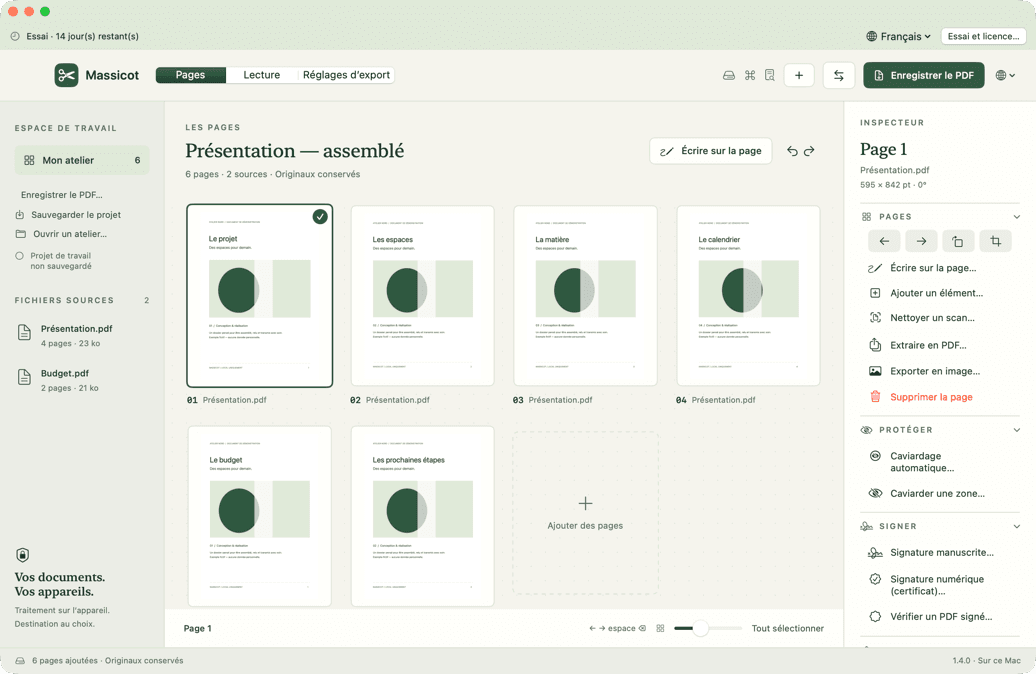
01 · PagesCompose.
Compose.
Page by page.
Sources on the left, pages in the middle, an inspector arranged by task on the right. Move, rotate, sign or protect each page, and step back with ⌘Z.
 Massicot · macOS
Assemble pages, annotate PDFs and prepare reusable exports. A document workspace that runs on your Mac. Try every feature free for 14 days.
A document to rework.
The app in pictures
Every space keeps your pages in view and your originals untouched.
Sources on the left, pages in the middle, an inspector arranged by task on the right. Move, rotate, sign or protect each page, and step back with ⌘Z.
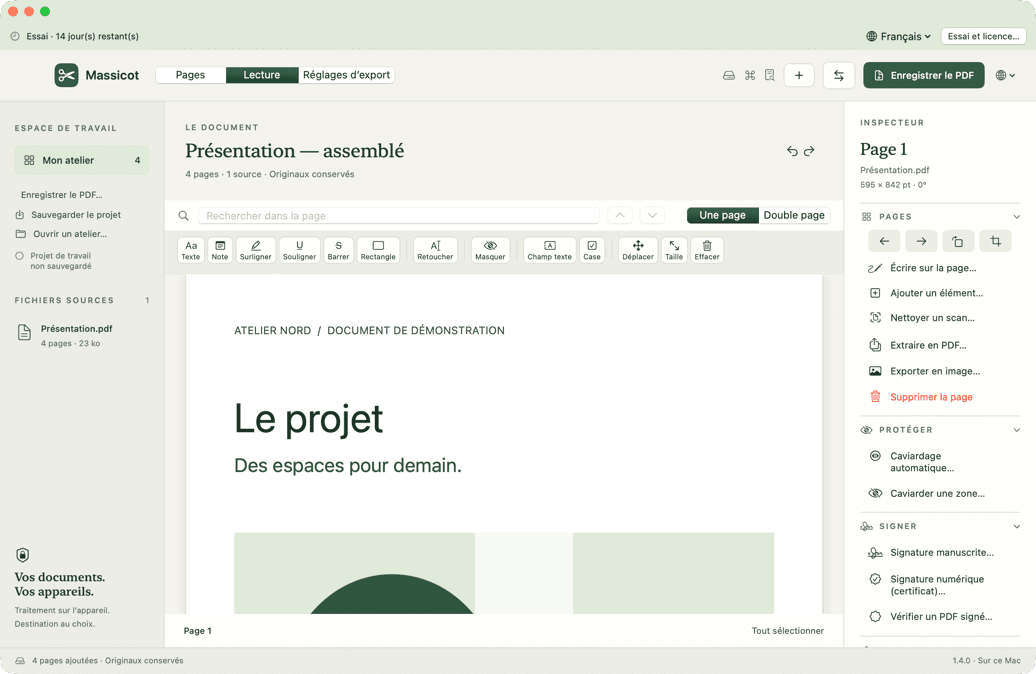
A large PDF preview, with named tools above the page: text, highlighting, notes, redaction and form fields.
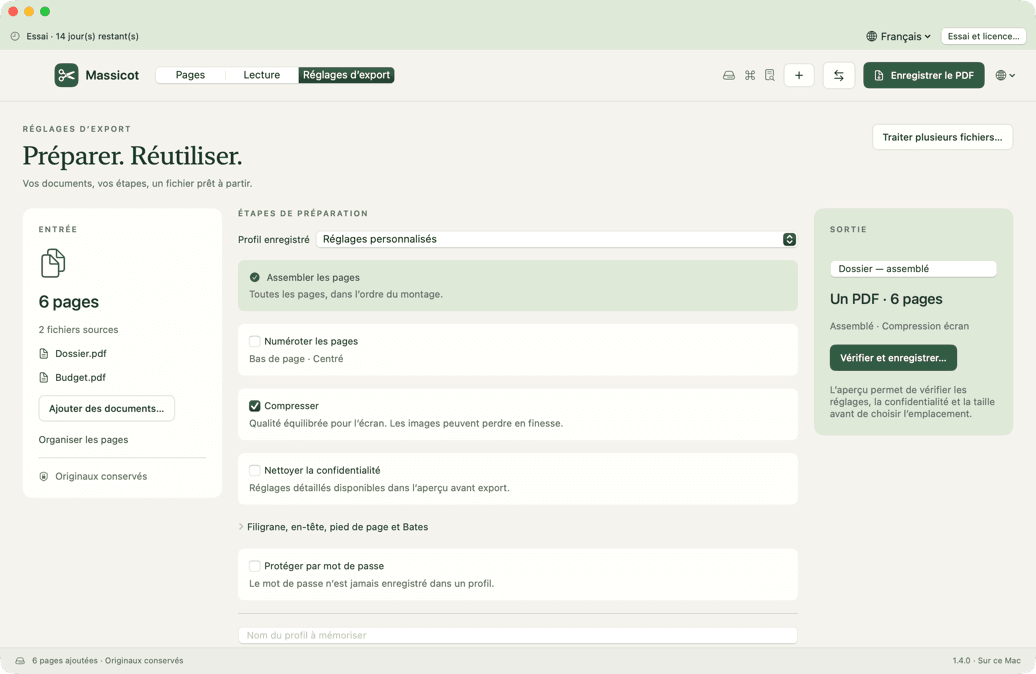
Choose the steps to apply, check the result in the preview, then save the profile to replay it on your next documents.
What makes it different
Massicot brings layout, annotation and export together in one tool, with no account and no remote service.
Your PDFs stay on your Mac. No account, no transfer, no remote AI. Summaries, questions, bookmarks and redaction rely on Apple Intelligence, which runs on your Mac.
Combine PDFs and images, reorder, rotate, crop and extract what matters.
Highlight, add notes, fill forms and add your drawn signature.
Save numbering, compression, cleanup and protection for your next exports.
Make a scanned document selectable, then export the recognized text.
Save a .massicot project that contains its pages and reopens without the original files.
What’s new · Version 1.5.1
Apple Intelligence, running on your Mac (macOS 26 and a compatible Mac), summarises the document in a few points and answers your questions: every answer points to the pages and passages it comes from, and nothing is shown without a quote found in the document. It also suggests bookmarks, the title and keywords, names form fields, explains the differences between two versions and extends redaction to dates of birth, case numbers, health data and everything about a person. macOS translates the text of the pages on your Mac and, on macOS 27, pictures are described for those who cannot see them. Nothing is sent. Since version 1.5.1, Massicot refuses every synchronized folder (iCloud Drive, Dropbox, OneDrive…): your documents open and save only on your Mac’s local storage.
Local text recognition, hidden information cleanup and password protection. Save a Massicot project to continue your work later.
To PDF, Word, RTF, text and Markdown convert on your Mac with their layout; LibreOffice, installed separately, is still needed for Excel and PowerPoint. From a PDF, Word gets the text, Excel extracts the cells and PowerPoint creates one image per page.
Simple by design
PDFs, images and Word documents by drag and drop; Excel and PowerPoint if LibreOffice is installed.
Reorder pages, annotate, sign and remove what you do not need.
Save the PDF, then store the profile for your next documents.
No. Massicot assembles, annotates and converts your documents on your Mac. Only license activation and verification contact Lemon Squeezy, and they never send any document.
Only if you want it to, and never online. On macOS 26 with a compatible Mac, Massicot uses Apple Intelligence to summarise a document, answer your questions, suggest bookmarks, name form fields, explain a comparison and find personal data to redact. Apple’s model runs on your Mac and no document is sent. Every summary and answer points to the pages it comes from: anything not found in the document is not shown. Finding IBANs, emails and numbers relies on verifiable rules, without AI.
The trial starts when you choose “Start the 14-day trial” in the app. Every feature is included, with no credit card and no automatic charge.
Editing features pause until you activate a license, but you can still save your current project so none of your work is lost.
The personal license covers two Macs. You can deactivate a Mac from “Trial and license” to free an activation and use it on another device.
A connection is required to activate the license and for periodic checks. Between two checks, a validated license keeps working offline for 30 days.
Yes. Word (.docx), RTF, text and Markdown documents are converted right on your Mac, with their styles, tables, images, lists, headers and footers. LibreOffice, installed separately, is still needed for Excel, PowerPoint, older .doc and .odt files, and Word charts. The other way round, from a PDF, Word gets the text, Excel extracts the cells and PowerPoint creates one image per page.
Yes. In “Convert”, choose the HEIC or HEIF photo, then the PDF format: the file is created on your Mac, with nothing sent. You can also add several photos, JPEG, PNG or TIFF images to your pages to combine them into a single PDF.
Massicot requires macOS 14 or later on an Apple Silicon Mac. See the download page for availability and version information.
Free for 14 days